How SKAI works
SKAI is the hub. Data comes in once, is completed and checked, and then goes out as several declarations. The principal and the declarant look at the same file. This is the architecture, the standard import chain, and the version that runs on events around the clock.
Architecture
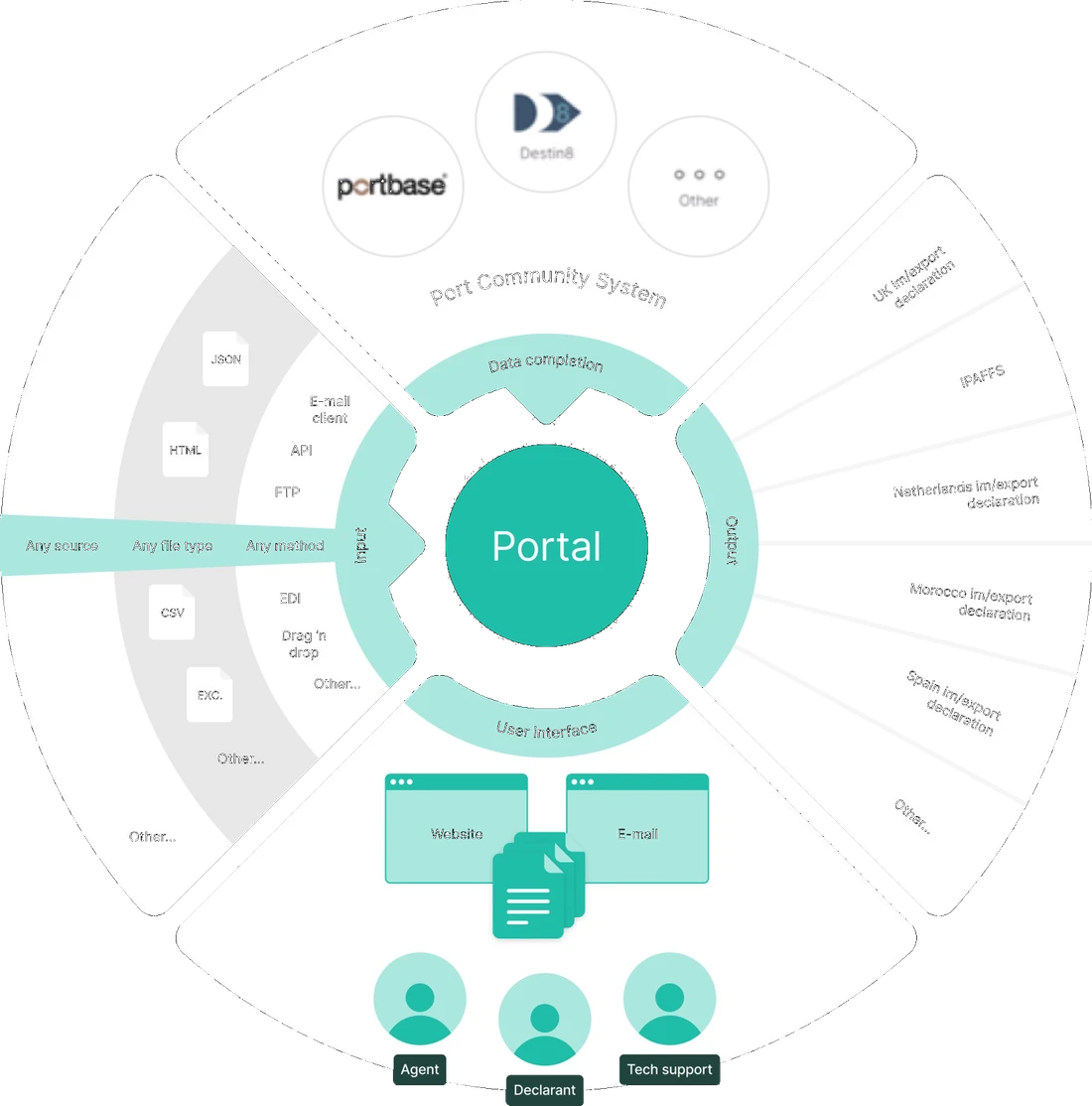
Four layers. One file.
Data comes in once. SKAI completes it, shows it and files it. Once the file is approved and complete, the chain runs 24/7.
- 01
Input
PDF, CSV, Excel, JSON, mail, API, EDI, FTP. It all becomes one file.
- 02
Completion
Portbase, MyTerminal and Customs fill in what the documents omit.
- 03
Interface
Declarant, principal and support see the same file, with different buttons.
- 04
Output
T1, unloading, IMA, CHED, CDS. Same source. Different counter.
What counts as input?
Input is everything that brings a consignment into SKAI: PDF, CSV, Excel, JSON, HTML, EDI, mail, API, FTP or an upload on screen. The format does not matter. SKAI reads invoices, packing lists, bills of lading, CMRs, health certificates and EUR.1 forms, and points every field back to the place on the document it came from. Once the file is approved and complete, the chain runs 24/7, including outside office hours.
Any format. One file.
PDF
Documents
CSV
Files
Excel
Spreadsheets
JSON
Messages
API
Integration
EDI
Stream
Mail
Inbox
FTP
Drop
HTML
Webmail
Upload
Screen
What does data completion add to the file?
What you get from the principal is rarely the whole consignment. The bill of lading names the vessel, not whether it is already on the quay. The invoice names the goods, not the container number the terminal uses. SKAI fetches those missing pieces from external systems such as Portbase, MyTerminal and Customs.
From the chain. Into the file.

Vessel, arrival, release

Container, quay, unloading

Status, MRN, messages
File complete
Who looks at the file in the interface?
The file is not only the declarant's. The principal wants to see whether the consignment has been declared, whether an inspection is running, whether the container may move. The forwarder wants exceptions, not the consignments that already check out. Support wants the source document on a field DMS refuses. SKAI shows the same file to those roles, with different buttons.
- WaitingCommercial InvoiceCommodity codes · values · weights
- WaitingPacking List, 48 linesQuantities · line matching
- WaitingHealth CertificateOrigin · validity · signature
- WaitingEUR.1 CertificatePreferential origin
- WaitingBill of LadingContainer · vessel · port of loading
What goes out as output?
Output is the declaration or the notification a gateway will accept. In the Netherlands that is an IMA, STO or ATO in DMS, a T1 or T2 in NCTS, an H7 in DECO, a CHED in TRACES-NT. In the United Kingdom that is a CDS import or export and an ENS. Belgium and Ireland sit in the same live set. Each channel gets its own data set, but the source is the file, not a new form.
DMS
Import declaration
IMA
- File
- #2026-04281
- MRN
- 26NL00000000000001
- Status
- Filed
Standard chain
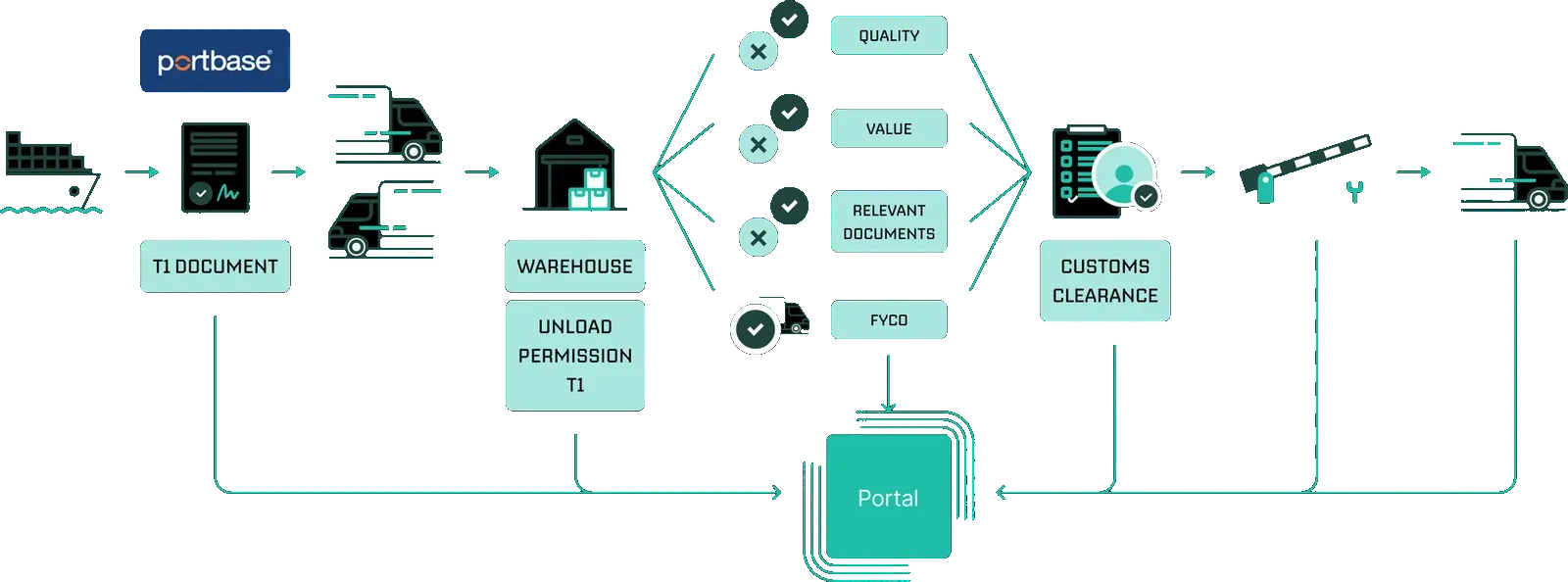
From T1 to import declaration, from one file
A common chain in the port does not start at the import declaration. The container arrives, often still under a T1 from the terminal or from the quay to an inland place. SKAI raises that T1 from the file: the data that was already in at intake, completed with what Portbase has reported about vessel and container.
Fully automatic
Validate first. Then the event pulls.
In the standard flow somebody still presses file, even though the file is full. In the event-driven chain that press is gone for the consignments that have passed validation. Up front SKAI checks the data: commodity code against the tariff database and TARIC, VAT through VIES, EORI against the register, documents against each other on weight, value and quantity. What does not check out stays put. What checks out may enter the chain.
Validation up front
Approved, the chain may run
Event
Vessel at the terminal
SKAI
01Raise the T1
Event
Container left the terminal
SKAI
02Request unloading
Event
Unloading approved
SKAI
03File the import declaration
Around the clock. A container into the warehouse at five in the morning does not wait for office hours.